20 April 2014

Borders and Permits (part 2)

You are traveling into or out of the US with your violin, and you are nervous. You've heard about instruments and/or bows being seized at the border. What do you do?

Potential problems

Certain species of plants and animals are "listed", meaning that there are restrictions placed on their import or export, either by US law or by International Treaty. Crossing a border with your personal property counts as "import/export" under these laws. Unfortunately, a number of materials used by luthiers are now "listed" So there is a very real possibility that you could run into trouble at the border.

The bow

  • Bow tip - it may be made of elephant ivory
  • Grip - may be made of lizard skin or snakeskin
  • Frog dots and buttons - probably mother of pearl or other shell
  • Stick itself may be pernambuco (a CITES-listed species)
  • Frog is ebony (but only Madagascar ebony is currently listed)

The violin

  • Fittings may be rosewood or ebony (but only certain species are a problem)
  • Fingerboard is ebony (again, only certain species are a problem)
  • There may be decorative elements that include ivory or shell
Maybe your instrument has no problems. The woods are all from permitted sources, your bow tip is bone or mammoth ivory, the grip is goatskin, and there are no pearl dots. But, more likely, you've always thought the tip was ivory - but it's 50 years old, that's pre-ivory ban, surely? And your bow has oystershell mother of pearl; that's not endangered.

What do you do?


All wildlife products, listed or not, must be declared at the border (that includes all mother-of-pearl, since even farmed oysters are considered "wildlife"), but only a few species are actually listed under the ESA (Endangered Species Act) or CITES (Convention on International Trade in Endangered Species). Only listed species require a permit. 

So first, determine if your instrument contains a listed species. 

If it does not, DOCUMENT this. Keep whatever records you have. Ask makers, repairers, appraisers to provide a statement of materials used. 

If the instrument/bow DOES include a listed species, you need to apply for a permit . Use form 3-200-23 for animal products (ivory, pearl) and 3-200-32 for plant species (pernambuco, Brazilian rosewood). It would be best to apply at least 2 months ahead of travel. 

In general, you will need the scientific name of the species, place of origin, and estimated age of original export/import. Originally, they wanted export permits from the country of origin and an import permit from the US, but these documents were not historically issued at the time many of today's bows were imported. Believe it or not, the FWS people ARE willing to work with us on this. 

Even if they are willing to work with us on the paperwork, there is another problem. You have to go in and out via a "designated port", where FWS have the facilities to examine the item. Unfortunately there are only 18 FWS-designated ports. The FWS rep at Mondomusica said it might be possible, by prearrangement, to use a different port, but it would be subject to their ability to send agents to meet you. I assume there would be a fee for this. 
 
The FWS is working with APHIS, the League of American Orchestras, and other organizations to develop an "instrument passport" system, but it is not yet functional. There will also be an orchestra/exhibition permit, that will cover a collection of instruments traveling together. 

Plant species regulations are less stringent than those for wildlife products. The APHIS rep at the Mondomusica talk said that they were not interested in finished products, only raw materials, so individual finished bows of pernambuco would not need permits. However, I have not yet found that documented on their website, and it doesn't entirely jive with the published directive to use form 3-200-32. I suspect the form is only for raw wood import, but I would call APHIS to verify this, and if necessary, submit the form anyway.

So that's the status at the moment. 

No permit needed

The problem with all of this, as I see it, is if at the start you determine your instrument does NOT have any listed material, or even anything that needs to be declared. Your bow has a synthetic tip, the grip is goatskin, and there is no pearl. So you happily go to the 'nothing to declare' line. But some customs agent decides that you should have declared that "ivory" tip, and asks for your permits, which of course you don't have, and he seizes the bow as contraband. He is wrong, and you can appeal, and (in as simple a case as this) it will get sorted out in a couple of weeks. But in the meantime, it is a hassle, and you don't have your bow.
One solution is to have a 'no permit needed' document. Another solution is to use something obviously synthetic. Bow tip material that fluoresces violently under UV is one possibility.

13 April 2014

Violin Materials and the Law (part 1)

At Mondomusica NY, a violin exhibition and trade show, there was a four-hour presentation/discussion on materials and legal/border problems. It was a very good talk. There were three representatives from the US Fish and Wildlife Service, which is responsible for the regulation of animal products, and three from the US Department of Agriculture APHIS, which is responsible for regulating plant products. In addition, there were representatives from the League of American Orchestras, a noted bow maker, a noted violinmaker, and a conservation lawyer.

I went largely because I am concerned about the newly-instituted changes in the ivory ban, which will affect classic bows. However, the talk only lightly touched on that.

There WERE a few other items of immediate concern to luthiers, that I hadn't even been aware were issues.

Does an item incorporate any wildlife product? If so, it must be declared.

Apparently, there's been a law on the books for a long time that you have to declare ANY products that use wildlife parts. This has not really been enforced until recently. This is a matter of declaring materials, not a matter of whether they are permitted (a different topic). ANY non-domesticated animal is considered wildlife. Farmed or captive-reared is not the same as domesticated.

How does this affect those of us in the violin trade?
  • ANY form of shell is considered a wildlife product, including shells from cultured oysters. All mother-of-pearl is a wildlife product, as is abalone and awabi.
  • Only leather from domesticated animals - cows, goats, sheep, etc. is exempt from having to be declared. Lizard or snakeskin grips are wildlife products.
  • Bone is not a wildlife product if it comes from a domesticated species. Most bone used by luthiers does not need to be declared.
  • All ivory is a wildlife product, as no domesticated species produces ivory. Even mammoth or mastodon ivory, which is legal and unregulated, must be declared.
Any declaration needs to have the full species name - genus and species. It should also have country of origin, if possible, and an estimate of age.

Commercial or non-commercial?

A second area of concern was the distinction between commercial and non-commercial use. The profession of the person taking an instrument across a border determines this, not the intended use of a particular instance. So - a luthier who is taking a personal instrument to a conference, to show it around, needs a commercial import/export permit. It doesn't matter that there is no intent to sell the instrument abroad. The permit is required if the person is in the trade. So, for instance, if I take an instrument with me, just to practice, when I go to visit family in Canada, I should have a permit, because I am in the trade. The discussion did not make it clear whether that applies to musicians who are not luthiers; it very well may, since playing for hire is a commercial activity.
The Fish and Wildlife Service people were actually very helpful, and repeatedly told us to call them, they were more than happy to help, they had no interest in causing problems. But they had to enforce the law.

We need some sort of negative documentation

However one thing that threw the government reps is that people want -- need, actually -- some sort of documentation that certifies when an instrument is free of anything that needs a permit. If a tip is made of high-quality synthetic ivory, no permit is needed, not even an import/export license; but how can we document that? A Customs agent can't be counted on to be able to tell the difference. If they don't believe you when you say the tip is synthetic, they can seize the bow. The USFWS representative explained that if there is a question, there is a procedure for seizure and expert identification - but that could take quite a bit of time.

I gathered from the conversation that FWS had envisioned the proposed "passports" as applying only to objects that do incorporate wildlife and thus come under their jurisdiction. They had not considered that completely exempt objects might need acceptable documents. They expressed willingness to work with some organization on this. This should be high priority for all of us. 

Meanwhile - luthiers should start using full scientific names for the materials we use, and state them on any receipts or invoices. This is needed for animal materials, of course, but the representatives from APHIS spoke about ebony and rosewood restrictions, and we should get into the habit of doing so for woods also. On the plant side, they have much greater latitude - in general, finished pieces do not face restrictions, while raw materials do. On the animal side, the bans are all or nothing - it doesn't matter how small a piece of animal material is in a piece.

Crossing borders

A luthier or anyone else "in the trade" who plans to cross out of or into the US with anything that has any restrictions should get an import/export permit, which costs $100 a year.
Any materials that require an ESA or CITES permit should have those lined up before FWS clearance is sought, and FWS clearance must be obtained before arriving at the border. It is best to contact FWS 48 hours ahead of time. There are a very limited number of "designated ports of entry"; entry through a different port might be possible with 72 hours notice and probably an additional fee.
All of that sounds like it is designed for large commercial shipments, and it is. Unfortunately, since "commercial" is defined for the person, it can be held to apply to trips by one in the trade with one's personal instrument.

However, there are apparently two types of certificates issued that can be issued to musicians - one, tied to the instrument, good for three years, which allows you to take the instrument in and out of the country during those three years. This is the "passport" they have been talking about.
There is also a traveling exhibition certificate, which allows a bunch of instruments to be taken in and out together, and is the permit issued to orchestras on tour.

Simple solution

The simplest solution is to avoid having any material on your instruments that is, or could reasonably be confused with, a restricted species. Remove all mother-of-pearl. Make sure all leather is goat, and have a receipt that says so. Replace tips with a synthetic substitute.

Of course, if you have an important bow or instrument, this would ruin the historical and artistic integrity of the piece. In that case, it will be necessary to get a permit. That is, if possible. In some cases (notably a piece that incorporates elephant ivory), it will not be legal to cross borders with it, or even sell it at all, as the law stands now.

Some woods are restricted in raw form, though right now finished products are okay. The only wood typically of concern on a violin is the ebony; Madagascar ebony is a listed species. But we don't know what will happen in the future. If you are making new, it might be advisable to find a substitute, or at least provide as much documentation as possible with an instrument. The same is true of pernambuco, for bows - right now, finished products are okay, but the species is listed in CITES.

02 September 2013

Week 6: explaining synthesizer modules

Note: These are not particularly esoteric posts; they repeat information found elsewhere, as is the case with most undergraduate-level homework assignments.
However, I hesitate to delete them, because some of the class discussions are still available online and removing the post will break the link. Also, they may be of some interest.


Introduction:

This is my 6th and final homework assignment for  Introduction to Music Production  at the Berklee College of Music, offered via Coursera. 

This week's topic was Synthesizers. I've never played with a synthesizer before, so I chose something fairly generic for my assignment:

"Explain the usage of the 5 most important synthesis modules: Oscillator, Filter, Amplifier, Envelope, and LFO. " 


Lesson:

Oscillator
The Oscillator is what initially creates the sound. The options -- different wave forms -- differ primarily in the sound spectrum produced. The basic waveforms are:
  • A sine wave is a pure tone, with no overtones. 
  • A sawtooth wave produces many harmonics. 
  • A Square or Triangle wave has overtones, but only the odd harmonics.  
  • Noise makes a hiss across all frequencies.
The oscillator differs from the oscillator built into a DAW in that it is modulated. Normally, pitch is what is modulated. When you hit different keys on a keyboard, the oscillator responds by changing the pitch of the sound.

To model a specific instrument, it helps to start with the appropriate waveform. For instance, a flute makes a pretty good "pure tone"; a sine wave. The "stick-slip" of a bow across the strings makes a sawtooth style wave. The opening and closing of a reed instrument is appropriately modeled by the on/off form of a square wave.

These are only the basic waveforms; there are others. The Zebralette synthesizer demonstrated in the class material has 16 different waveforms you can choose from.   

Filter 
The waveform as it comes out of the oscillator is somewhat useless. It has energy all over the place, even up into frequencies we don't really hear. It's very bright (and probably buzzy or piercing or hissy, as well). To make it begin to sound like an instrument, we need to take out the unwanted frequencies. We do this with a filter. 

A Low Pass Filter is probably the most important filter; it removes all the hiss and noise above a designated frequency. You can have any of the other EQ-type filters, though.

But remember, in a synthesizer, all these effects are modulated over time. Changing the filter changes the timbre, changes the nature of the sound. 

In Zebralette, and in the other synthesizers I've looked at, there are a whole bunch of "spectral effects" filters. These can be very complex and very confusing. For instance, there is one called "Formanzilla", which "Multiplies the wave spectrum with a variable harmonic, resulting in ‘formant’ sounds with a number of strong peaks and troughs."  Zebralette comes with dozens of these presets.

Amplifier
This is more than just gain; it is amplification over time. Basically, when you hit a key on the keyboard, that turns on the amplifier, and when you take your finger off that key, you turn off the amplification. The way the amplification occurs, how fast it happens, what levels it goes to, and how it shuts off, are all characteristics that define the sound of an instrument. We control this by defining an envelope for the sound:

Envelope
The Envelope of the produced sound consists of four parts: Attack Time, Decay Time, Sustain Level, and Release Time.  (This picture is from the Zebralette manual, and has an additional parameter, F/R)

When you hit a key to play a note,  the oscillator starts a wave form at zero volume which then climbs to the maximum set volume. The amount of time it takes to do this is called the Attack time. It the attack time is zero, then the sound starts with an audible "click". Most natural instruments have a short, but non-zero, attack time. 
The Decay time is the amount of time for that initial amplitude to drop to a sustained level. So to discuss decay, we have to first talk about Sustain. 
Sustain Level is the amplitude at which a sound stays when you hold the note. If you pluck a string, or hit a drum, the sustain will be negligible. But if you bow a string, or play a flute, the note will play as long as you are bowing or blowing. That is the sustain. A piano doesn't have this sort of sustain; it is a plucked string. An organ, on the other hand, keeps playing as long as the key is pressed. 
So back to decay for a moment. When you hit a key, the sound goes from zero to max volume during the attack phase, and then the sound decays -- lowers in volume - until it gets to the sustain volume level. This takes a certain amount of time, which you can define as the Decay time. 
Finally, what happens when you take your finger off the key? A "note off" signal is sent, which triggers the sound to drop to zero amplitude, over a certain period of time. The amount of time this takes is called the Release time. An abrupt cessation of sound will make a click; there needs to be some amount of time for it to sound natural. A long release can sound like the sound echoing away.


The Zebralette synthesizer (one of the ones recommended for class) has a setting for shape of the envelope - whether the lines curve or not -- and two additional knobs:
The Fall/Rise knob determines a change at the beginning of the sustain phase, sort of an attack into the sustain level. 
There is also a Velocity knob which apparently interacts with keyboard velocity. I do not have a keyboard, so I could not play with that. 


LFO
The Low Frequency Oscillator is different from the main oscillator, in that its purpose is not to produce a sound. Instead, it applies a cyclic change to the main signal. 

A good example is vibrato. Vibrato is a cyclic change in pitch. The pitch goes up and down, perhaps 6 times per second. Remember that cycles-per-second is another name for hertz. We specify how fast the vibrato should be - a low one might be 3 Hz, a fast one 6 Hz, whatever. In Zebralette, this rate is labeled "Sync" and is connected to the song tempo.  
We can also say how sharp and flat to make the note - that would be the amplitude of the LFO. This is labeled "Depth Mod" on the LFO1 module of Zebralette. 
We can also specify the waveform of the modulation, which might mimic the different types of vibrato - a smooth vibrato might be best modeled by a sine wave, and even up and down. A jazz vibrato might be better modeled with a sawtooth wave - a quick rise in pitch followed by a more leisurely fall. 

An LFO is not just a method of adding vibrato, though. You can use an LFO to run any of the sound parameters through a cycle. You can even run LFO effects through other LFO effects... very complicated. 

========

Reflection:

I can't believe we are at the end of the course already. I feel that I am only just beginning to get a handle on my DAW. I've never played with a synthesizer until this week. I found that Louden's EduSynth was invaluable in getting a grasp on what they are about, but it was a bit of a shock to try to transfer that to Zebralette. FreeAlpha seems to be a bit closer to EduSynth, but I had trouble getting it to install properly.

Thank you so much for reading this, and for your feedback.
Not only that, I would like to thank all the other students in this course. So many of you have done such fantastic work. It's been a fantastic course, and a fantastic opportunity to see and hear some wonderful efforts.   -Claire

26 August 2013

Week 5 - Setting EQ presets (Audacity)

We've gotten to week 5 of  Introduction to Music Production  at the Berklee College of Music, offered via Coursera. We have really been getting under the hood, so to speak, of our DAW. 

This week, for my homework assignment, I have chosen the suggested topic:


"Demonstrate the configuring of an EQ plugin to function like a large format mixing console EQ section. You can use the settings shown in the material or base your settings off of the manual of another mixing board. Include instructions showing how to save the setting as a preset in your DAW"

Lesson:
The analog mixer shown in the course material had five preset EQ filters:

  • HP (high pass) flat 75 Hz 18 or 24 dB/OCT
    Sounds below 75 Hz tend to be environmental noise, mic fumblings, and mouth noises; by rolling it off at a rate of 18 dB per octave, these unwanted noises are reduced, if not eliminated. 
  • Low Shelf 80 Hz   +/- 15dB  (9.8 Q)
    This filter reduces the volume of very low-pitch sounds, but only by a set amount. This creates a lower-volume "shelf", instead of continuing to reduce the volume per octave. Combining these two low-end filters creates a softer, more natural sounding fall-off. 
  • Low Mid Bell 400 Hz (340) Range 100 to 2K +/- 15  (1 Q)
    The fundamental frequency of most instruments fall in this range. Too much fundamental can make the sound heavy and "boxy", while too little relative to the overtones can make the sound thin and ungrounded. For vocals, you might want to lower this area a tiny bit.
  • High Mid Bell 2K (2014 Hz) range 400 to 8K) +/- 15  (1 Q)
    This is the band that holds the overtones, that really define the timbre of a sound. A very slight boost here can often add brightness and "air". 
  • High Shelf   12000 Hz  +/- 15  (1Q)
    Sounds over 12000 Hz tend to consist of hiss and other unwanted sounds, so the volume in that range can be lowered. By using a shelf instead of a low pass filter, the volume is never rolled off to nothing. 

In each case, the filter is defined by 
  • a frequency (in Hz) defining the center of the bell curve (or the threshold of a shelf or pass filter)
  • an amount by which the volume is changed (+/- 15 dB in the model mixer, though you rarely want to change the gain by more than 6 dB)
  • the width of the bell curve (a number called Q)

Q: So how do we make these filters in a DAW?
A: We use a plug-in.  

There are hundreds of plug-ins available that work with most DAW programs. In class, Dr. Stearns used iZotrope Alloy. Alloy's interface mimics the look and feel of an analog mixing board. That plugin costs $199, and although I downloaded the trial version, I wanted to see what I could do with the open-source plugins available for the open-source DAW, Audacity. 

The basic Audacity Equalization plugin is found under the effects menu:


When you open it, you get a graph. You can manipulate the graph by directly dragging parts of it up or down. You can also click on the "Graphic EQ" button to show graphic equalizer sliders. 

Note that by default, the equalizer comes up with a low-end rolloff. I used the Graphic EQ setting, and tried to emulate the settings outlined above. 

The High Pass and the Low Shelf filters interacted to make a sort of wiggly roll off profile. The small bumps around 400 Hz and 2000 Hz represent the Low Mid Bell and the High Mid Bell filters. The High Shelf reduces the upper frequencies to a limited extent. 

To save this as a preset, one simply clicks on Save/Manage Curves:


This is now available under the "Select Curve" presets:


The default graphic equalizer is nowhere near as elegant as iZotope Alloy, but it serves the purpose. 
However, there are some slightly slicker, but still free, plugins that deserve investigation.
This one, Camel Phat, for instance, looks like it can do all that and quite a bit more:


Investigating all of the thousands of available plugins seems to be an impossible task! But it seems that if you know the parameters of what you want to do, you can do it in a number of ways. 

=======================

Reflection:
This was a difficult assignment, in that nothing quite seemed to resemble what Louden had demonstrated in the videos. I tried several different approaches; the multiplicity of plugins was overwhelming. I found that I could create individual filters and apply them sequentially, but I wanted one plugin that would do it all. The graphic equalizer would do it, but I am not quite happy with the interaction of the HighPass and the Low Shelf filters. I  have not fully explored the Camel Phat plugins, but certainly plan to. I have used Audacity for awhile, and never knew it could do so much more than what I was using it for. 

Thank you for reading this. 
Please, if you find an inaccuracy, leave a comment. I want these blog posts to be more than just a homework assignment; I want them to be useful. Again, thank you. 

19 August 2013

Dynamic Range -- IMP Week 4

Hi folks -
Welcome to my latest assignment from week 4 of "Introduction to Music Production", an online course from Berklee College of Music via Coursera. We are really getting into the nitty-gritty!

My chosen topic this time is:

Explain Dynamic Range and the many ways producers manipulate dynamic range.

=== Lesson ===

Dynamic range, in acoustics, is the ratio between the volume -- the sound pressure level -- at which no sound can be heard, and the volume at which ear damage or pain occurs.
[Dynamic range can also refer to the theoretical limitations of a piece of equipment, but the equipment here is the human ear, so hearing threshold and pain threshold are appropriate parameters.]

To start talking about loudness of a sound, we have to start with the sound itself. 

Technical stuff
Sound in air consists of a sequence of compressions and matching rarifications. A sound with one thousand of these sequences per second has a frequency of 1000 CPS (cycles per second), also called 1000 Hz (hertz, named for physicist Heinrich Hertz). The frequency of the sound is what we hear as pitch, and contributes to timbre. The volume of the sound, however, is determined by the average* sound pressure level (SPL) of the wave compressions.  That is what we perceive as loudness. 

Note that loudness is how we perceive sound pressure. They are not quite the same thing. For one thing, the ear is more sensitive in some frequencies than in others. We hear best in the 1000-4000 Hz range, which is where the vocal overtones that let us distinguish speech sounds fall. Strong overtones, such as those generated by distortion, do not necessarily add physical volume (same SPL), but they increase the perceived volume, or loudness. 

In physics, we measure pressure in Pascals. The lowest sound pressure level (SPL) the human ear can hear is about 20 microPascals (μPa). In acoustics, we call this zero decibels, and use that as the baseline to define the human hearing dynamic range. 

The upper end of the human hearing dynamic range is the sound pressure which is actually painful, and can cause permanant damage to the ear with only a short exposure.  This is usually considered somewhere around 120-140 decibels. 

Decibels are logarithmic. A dynamic range of 0 to 100 dB would be from 20 to 100,000 microPascals. 

So how does the concept of dynamic range apply to sound recording? 

First, in any situation, there will be a certain amount of ambient noise. In even the quietest concert hall, there will be the sound of people breathing, moving, shifting their weight; in a cafe setting, there will be (hopefully quiet) conversations and noises from the food and drink. In a studio, there will be electronics noises. The "noise floor" essentially raises the bottom end of the dynamic range. A "noise ceiling" is also provided by the point at which the signal approaches distortion levels, or even just uncomfortable levels. 

Basically, to change the dynamic range, we can amplify or lower the loud parts, thus changing the "ceiling" of the dynamic range, or we can amplify or lower the soft parts, thus changing the "floor" of the dynamic range. 

Sometimes you need to change the level of a track, for instance when a vocalist varies the mic/mouth distance, or when the audience joins in on a chorus. But when would we want to change the overall dynamic range?

One example for which a reduced dynamic range might be desirable is narrating audiobooks. While a certain amount of dynamic variation adds interest to the storytelling, the volume must not vary so much as to make the words in a quiet passage hard to understand, or a shouted part unpleasant. 

"Mood music" is another genre which calls for a reduced dynamic range, as it is often geared towards a hypnotic smoothness. 

On the other hand, a movie may have a soundtrack designed to have a huge dynamic range; a film may have a whispered conversation in one part, a subliminal tone in another, and then try to shock you out of your seat with huge explosions. 

There is an unfortunate trend towards reduced dynamic range in the guise of increased loudness. If everything is loud, then the dynamic range is restricted to a boring monotone, just a monotone with unpleasant clipping. Here are some very good articles:

In Celebration of Dynamic Range by Matthew MacGlynn


*Footnote: To measure loudness, we want an average of the sound pressures of the cycles. However, the way math works, since compressions (positive number) are paired with rarifications (negative number), the pairs average to zero. To get around this, we have to first square the figures. This makes all the values positive numbers. Then we average the values, and take the square root. This gives us what is called the "root mean square" or RMS value.

=== Reflection ===

I hope I didn't get too technical on the "explain dynamic range" part. I found it fascinating, and had gone off on a tangent on exactly what a decibel is, before I decided that was really not appropriate and deleted it. But I do have definite geeky tendencies. 

Those articles on dynamic range were especially interesting. The first is a lament; the second is really more informative. But they both talk about a problem that I hadn't really been aware existed. 
Again, I wish I had more time to devote to this assignment. I need to spend a LOT more time playing with my DAW. 
Thank you for wading through this. 

11 August 2013

Categories of Effects (week 3)

== Introduction ==
It's now the end of the third week of "Introduction to Music Production", an online course from Berklee  College of Music via Coursera. We have been learning the editing functions of our DAW.

For this, our third assignment, I chose the suggested topic:

• Categories of effects: Teach the effect categories including which plugins go in each category and which property of sound each category relates to.

== Lesson ==
Sound
First, a review of some properties of sound. There are three properties that we often wish to manipulate:
1. Amplitude refers to what we perceive as loudness of a sound. We often want to raise or lower the loudness of one track relative to the others. More technically, though, we want to amplify the signal to a certain level, but not have it exceed another level. We are affecting the dynamics of the sound.

2. Frequency refers to what we perceive as pitch, but it is really far more complex than that. A tone has a series of harmonics, and it is the relative strengths of those harmonics that give a sound its perceived timbre. We can apply filters that affect certain frequencies, that then change the timbre of a sound.

3. Propagation refers to the movement of sound through a medium; through the air, and how it is reflected from surfaces. The time difference of the signal as it enters our two ears allow us to tell which direction a sound is coming from. We also use a sort of unconscious echolocation, so that the time delay properties of the sound tell us how large a room we are in.

In a DAW, these properties are manipulated using plug-in, and are called "effects". An effect can be applied to one track, or tracks can be sent to a common bus, and the effect applied to the bus.

Categories of Effects

Dynamic Effects, also called "Volume Changing" effects. 
These are related to amplitude; they automatically control volume based on the material over 
time. 
Examples are compressors, limiters, expanders and gates. 
Generally, this type of effect determines the overall or perceived volume of the track. They make the tracks sound more even, not too loud or too soft. 
A Limiter can raise the overall volume of a track (by setting the Limiter threshold low), but the volume never goes over the specified limit, so the track is never so loud that it "clips". If you set the Limit and Threshold too low, you can squish the dynamics. That's one way to make elevator music.   

Filter Effects, also called "Sound Shaping" effects
These control the timbre of the sound. If you recall, timbre is the result of the presence of certain overtones or harmonics of the sound. If you change that pattern of overtones, you change the timbre. 
Filters change those overtone patterns. EQ filters, such as parametric filters or graphic equalizers, are examples, as are any high- or low-pass filters.  


The range of about 4000-6000 Hz is called the "Presence" range. You can bring a voice or instrument forward or pull it back by a slight gain or drop of these frequencies.

Delay Effects, also called "Time-Based" effects. 
They add slight delays to the signal, and are thus related to the propagation principle of sound.
Examples are reverbs, delays, choruses, phasers, and flangers. 
The cool thing about these effects is that you can create an audio illusion. You see, if someone is playing in a small room, the sound signals come to both of the listener's ears directly and nearly simultaneously. In a large room, the sound echoes a bit. If you apply a bit of delay to a track, it will sound as if the sound is being played in a large room. This illusion is so great that most DAWs have preset effects for "large room", "small room", etc. 
A touch of delay can also just make a track sound fuller and richer. 

In Reaper, there are over 200 plug-ins that come with the program. Of note are:
ReaComp - a compressor; a type of dynamic effect.
ReaDelay - a delay effect used to make sounds fuller or thinner
ReaEQ - a filter effect that adjusts the frequency spectrum to change timbre
ReaGate - a filter effect that filters out sound when the volume falls below a specified threshold. 
ReaPitch - a filter that can raise or lower the pitch of a sound, or of certain harmonic peaks. 
ReaVerb - a delay effect that focuses more on actual reverb and echoes

VST stands for Virtual Studio Technology; VST plugin effects are used by a number of DAWs. There are also VST instrument plugins, and VST MIDI effects. 

Each effect has a number of parameters that can be set, but most also have presets that can be used. 

=== Reflection ===

I found it very helpful to place effects in categories. However, some effects cross the boundaries. For instance, the ReaGate effect really falls into two categories -- it uses a filter to determine whether to apply a dynamic effect.  So all is not black and white. 

This topic didn't really call for screen shots. I hope this text-version is okay, and is understandable. 
Thank you for taking the time to read it. 

05 August 2013

Recording Audio using Audacity

Hello again, dear readers!
This is Claire - but you knew that, since this is my blog.

Once again, I present an assignment for the online Coursera/Berklee course "Introduction to Music Production". This is week 2 (lesson 2), and we were again given a list of possible assignments.
I have chosen to do the second one:


• Record audio in your DAW including preparing the project, creating the track(s), setting the click and countoff, and recording efficiently.

Lesson: 

My audio chain is as follows:


1. AKG Perception 220 microphone
      connected by an XLR cable to


2. Onyx Blackjack USB recording interface
      connected by a USB cord to a Mac running


3. Audacity DAW
Audacity is open-source and free, and available for Mac. Linux, and Windows.


Recording the audio starts with preparing the project. So, to my mind, this assignment includes the first topic, namely • Prepare a project in your DAW using the project checklist from the material as your guidelines. In any case, even though I am going beyond simply preparing the project, I find checklists very useful, and recommend their use to anyone.

My project list, based on what was presented in the lectures, is as follows:


The first thing is to determine the
 1. Project name and location.
I created a folder called "IMP-sandbox" on my desktop. A"sandbox", in programming, is a place to experiment,. Since this project is purely experimental, the name seemed appropriate to me.
For your project, use whatever name seems best to you.

Next, set the
2. Digital Audio Preferences -- use a sample rate of 48,000 Hz and a bit depth of 24.  This is higher quality than the CD-standard of 44,100 Hz and 16-bit. However, a little extra quality doesn't hurt, and if you deal with soundtracks, 48 kHz syncs more easily with standard video than does 44.1 kHz.

In Audacity, this is set in Preferences:
3. Recording file type 
This should be set to uncompressed; broadcast WAV, AIFF, or WAV.
As it happens, Audacity saves files when recording using its own .au file format. Only when you choose to export a recording are you offered a choice of file formats. Therefore, this is not a setting to be set now; this is something we must keep in mind when it comes time to finalize the recording.

4. Hardware settings
This is necessary to do because th system audio setting for input and output do not necessarily affect the DAW settings.
In Audacity, it is simple enough to choose the appropriate input and output (the Onyx BlackJack interface) from the pulldown menu.  However, the pulldown will not show your interface unless you plugged in the interface before you started Audacity.
Once the interface is plugged in, it will show up in the pulldown menu.  I found that it was not necessary to have the microphone attached to the BlackJack. Of course, when you DO attach the microphone, make sure all the levels are down and the phantom power is off, so you do not generate damaging clicks.
5. Buffer size
When recording using a DAW, there is a certain delay - perhaps only milliseconds - between the production of a sound and when you hear it in the monitor. This is called latency. When recording, you want the latency to be as small as possible; you don't want to notice it at all. So you want a small buffer, perhaps storing only 128 samples. But that means the computer has to work very hard to continuously process the buffer. It's like trying to bail out a leaky boat with a teacup -- you have to work much harder to keep up with the leak than if you could use a large bucket.
Later, when editing, the computer will have to do many more things, as it juggles multiple tracks, plugins, and effects. At that time, you may need to increase the buffer size, perhaps to 1024 samples.
There will be more latency, but that will not be terribly important at that point.

Audacity seems a bit peculiar when specifying buffer size. It does not give the option of # samples. Instead, it has a place to enter milliseconds:
The default is 100, and I left it at that. Since there are 1000 milliseconds in a second, 100 milliseconds is one-tenth of a second, and it seemed to me that was a small enough delay.

Now we are up to the recording part of the checklist!
The first item here -- 1. check your settings -- refers to what we have just done, so we don't need to go through that again. But it is a good idea to double-check everything.

2. Create a track - choose mono or stereo
To create a track in Audacity, you use the menus: Tracks > Add New > Audio Track. Or, you can use the keyboard shortcut of shift-command-N.
Once you have created the track, you can set it to mono, or left or right of a stereo track. Use the "Audio Trac" pulldown menu. Note you can also set bit depth (they call it sample format) and rate on this menu, if you were to want to set specifications for the track that were different from the project defaults.
3. Name the track
You use the same "Audio Trac" pulldown to name the track. In the picture above, you can see the first item in the menu allows you to name the track.

4. Record-enable the track
The track comes pre-enabled in Audacity -- in fact, I could not find a place to disable the record enable.

5. Set your levels using the microphone pre-amp
On the BlackJack interface, I made sure the levels were down and the phantom power off before connecting the microphone. With the microphone connected, I turned on the phantom power (because I have a condenser mic) and brought the gain up. In Audacity, you have to click on the meter space above the microphone picture to turn on the meter for non-recording level setting.

The BlackJack has a marking for Unity, so I first made a test recording with the level set there. It was far too low. Audacity is a bit confusing here, because the level meter uses a pink and red indicator. Red in this case does NOT mean you are in the distortion/clipping range.
The BlackJack, however, has a signal light that displays the expected behavior: green to indicate a sound signal; yellow to indicate a peak. (And presumably, red for clipping, but I did not go there.)
During file playback, the Audacity level meters show the expected green/yellow colors (the playback meter is to the left of the record meter). I do not know why the designers did this.

To set the levels, it was necessary to watch both the single LED on the BlackJack and the level meter in Audacity.

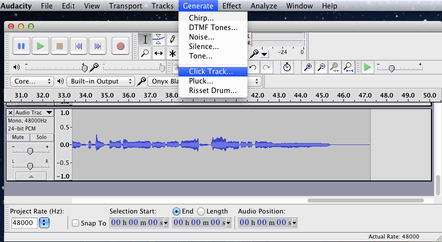
6. Enable the click track and count off
In Audacity, you turn on the click track by going to Generate > Click Track :

7. Record (efficiently!)
Time to click on the red dot to start recording, record, then click on the button marked with a square to stop recording.
My result:
This screenshot was taken during playback, and notice that the playback levels are green.

The recording's done!! Now a few more tracks ... editing ... comping ... normalizing .... hmmm. I guess it's not quite time to celebrate - there's still a lot of work to do!

Thank you for taking the time to read this. I hope it has been of some use, and I welcome any comments.

Reflection

Audacity is a free, open-source DAW. Although I have used others, that's the one I've mostly used. However, I found when trying to find the various editing functions, that Audacity is peculiar in many respects. This lesson shows two things that seem odd; one, that buffer is in milliseconds rather than in samples, and two, that the record level meter is in red.

As I investigated the editing functions, there were enough things that were odd that I decided to download Reaper, a program that many people on the message boards seem to like. However, I did not have time to learn a whole new system. So I selected a topic that really review's last week's work, rather than one that uses more of the editing skills we have been learning this week. I am still trying to find my way around Reaper.